X12.NET
EdiFabric C# .NET Examples for X12 4010 and HIPAA 5010
EdiFabric C# .NET Examples for X12
EdiFabric 11.0.0 is a .NET SDK that parses, generates, validates, acknowledges, and splits EDI files. These examples cover X12 4010 and HIPAA 5010.
EdiFabric does not include communication components (AS2 or SFTP), a dashboard, or a UI. It is a library you call from your own application.
The .NET 6 projects compile the same sources as the .NET Framework 4.8 projects. Both solutions reference EdiFabric 11.0.0 from NuGet. The examples target .NET 6 for backward compatibility. EdiFabric 11.0.0 also ships targets for .NET 8, .NET 9, and .NET 10. To evaluate one of those, change TargetFramework in the project file and rebuild.
| Path | Purpose |
|---|---|
NET 6/EdiFabric.Examples.X12.sln |
.NET 6 solution |
NET Framework 4.8/EdiFabric.Examples.X12.sln |
.NET Framework 4.8 solution |
NET Framework 4.8/EdiFabric.Examples.X12.Common/Config.cs |
Serial key shared by every example |
NET Framework 4.8/EdiFabric.Examples.X12.Demo/Program.cs |
Runnable walkthrough: read, then validate |
NET Framework 4.8/EdiFabric.Examples.X12.Templates |
C# templates used by the examples |
Files/ |
Sample X12 and HIPAA interchanges |
Templates
EdiFabric reads and writes EDI through templates: C# classes that describe each transaction, its loops, segments, data elements and codes. The examples keep their templates as C# files in the EdiFabric.Examples.X12.Templates class library, one file per transaction plus the shared segments, composites and codes for each version. The examples reference that project and pass its assembly name to X12Reader. This is how you use templates in your own application: download the C# files, add them to a class library, and reference it. See EDI templates.
EdiFabric.Examples.X12.Demo uses complete, precompiled template sets for X12 4010 and HIPAA 5010 (including pre-errata), so you can try it with a wider range of message types.
Requirements
- Visual Studio 2022, or the .NET SDK. Download Visual Studio.
- .NET 6 for
NET 6/EdiFabric.Examples.X12.sln. The projects set<TargetFramework>net6.0</TargetFramework>so they stay compatible with existing .NET 6 apps. EdiFabric 11.0.0 also providesnet8.0,net9.0, andnet10.0. To evaluate a later version, change that property (for example tonet8.0) and rebuild. - .NET Framework 4.8 for
NET Framework 4.8/EdiFabric.Examples.X12.sln.
All projects can be evaluated with the demo serial key bd96a836feca45cb91c86ee65d281f52 without creating an account. It is already set in TrialSerialKey in NET Framework 4.8/EdiFabric.Examples.X12.Common/Config.cs. This provisional key has a limited quota. Once it runs out, you need an account and a Community subscription to continue the evaluation:
- Sign up free for Community to get your own evaluation serial key. Community never expires, requires no credit card, and is for non-production use. The first 14 days after you subscribe have unlimited operations, then the quota is 250 per day. To extend the unlimited period, ask through the support portal or at support@edifabric.com. After signup, retrieve your serial from Your Account.
- Replace the demo key in
TrialSerialKeywith your serial. The .NET 6 projects link this file, so one edit covers both solutions.
NuGet restore pulls EdiFabric 11.0.0.
Getting started
The demo serial key in Config.TrialSerialKey works without an account. When its quota runs out, sign up free for Community at edifabric.com/pricing and put your own serial there. Open a solution, set EdiFabric.Examples.X12.Demo as the startup project, and run it.
From the command line:
cd "NET 6/EdiFabric.Examples.X12.Demo"
dotnet run
The demo reads Files/X12/PurchaseOrders.txt with the X12 4010 templates and Files/HIPAA/ClaimPayment.txt with the HIPAA 5010 templates. It parses every transaction with X12Reader and validates each one with IsValid. Set a breakpoint at the end of Translate_X12_4010 or Translate_HIPAA_5010 and inspect ediItems.
To translate your own file, change the path in EdiFabric.Examples.X12.Demo/Program.cs.
Usage
Every example calls License.SetSerial before it reads or writes. On Community that is the call to use. See Licensing for Developer and Enterprise.
using EdiFabric.Core.Model.Edi;
using EdiFabric.Framework.Readers;
using EdiFabric.Templates.X12004010;

License.SetSerial(serial);   // from your Community or paid plan

var ediStream = File.OpenRead(@"Files\X12\PurchaseOrders.txt");

List<IEdiItem> ediItems;
using (var ediReader = new X12Reader(ediStream, "EdiFabric.Examples.X12.Templates"))
    ediItems = ediReader.ReadToEnd().ToList();

var purchaseOrders = ediItems.OfType<TS850>();
X12Reader takes the stream and the name of the assembly that contains the templates, here EdiFabric.Examples.X12.Templates. ReadToEnd loads the interchange into memory. For large files, use the streaming samples in ReadEDI.
Validation and acknowledgments
After a transaction parses, IsValid checks it against the template. ValidateEDI shows custom codes, data types, and ISA and GS. AcknowledgeEDI builds a 997 for a valid group, an invalid group, and duplicates.
foreach (var message in ediItems.OfType<EdiMessage>())
{
    if (message.HasErrors)
        continue;

    MessageErrorContext mec;
    if (!message.IsValid(out mec))
    {
        var validationIssues = mec.Flatten();
    }
}
Writing EDI
WriteEDI builds an interchange with X12Writer: ISA, then GS, then the transaction. The same project covers custom delimiters, a postfix after each segment, batches, and empty data elements.
using (var stream = new MemoryStream())
{
    using (var writer = new X12Writer(stream))
    {
        writer.Write(SegmentBuilders.BuildIsa("1"));
        writer.Write(SegmentBuilders.BuildGs("1"));
        writer.Write(invoice);
    }
}
Examples by feature
| Project | What it shows |
|---|---|
EdiFabric.Examples.X12.Demo |
Read an X12 4010 file and a HIPAA 5010 file, then validate each transaction |
EdiFabric.Examples.X12.ReadEDI |
Read to end, stream, batch, split on a repeating loop, corrupt files, partner templates, custom ISA/GS |
EdiFabric.Examples.X12.WriteEDI |
Write to a stream or file, delimiters, new lines, batches, empty elements, no auto trailers |
EdiFabric.Examples.X12.ValidateEDI |
Validate after read and before write, custom codes, data types, ISA and GS, 810, 850, and 837P |
EdiFabric.Examples.X12.AcknowledgeEDI |
Generate and read 997 |
EdiFabric.Examples.X12.JSON |
Serialize and deserialize JSON |
EdiFabric.Examples.X12.XML |
XmlSerializer and DataContractSerializer |
EdiFabric.Examples.X12.CSV |
Import and export CSV |
EdiFabric.Examples.X12.DB |
Save and reload an 850 with EF Core (create the database before you run it) |
EdiFabric.Examples.X12.T837P.DB |
Save and reload an 837P with EF Core (create the database before you run it) |
EdiFabric.Examples.X12.MapEDI |
Map with AutoMapper and XSLT |
EdiFabric.Examples.X12.ModifyTemplates |
Parse a partner-specific 850 template |
EdiFabric.Examples.X12.Templates |
C# templates for X12 4010 and HIPAA 5010, used by the examples |
Examples by message type
Each project reads a sample file and writes the same transaction back out.
| Project | Transaction |
|---|---|
EdiFabric.Examples.X12.T210 |
X12 4010 210, freight invoice |
EdiFabric.Examples.X12.T214 |
X12 4010 214, shipment status |
EdiFabric.Examples.X12.T404 |
X12 4010 404, rail carrier shipment |
EdiFabric.Examples.X12.T810 |
X12 4010 810, invoice |
EdiFabric.Examples.X12.T824 |
X12 4010 824, application advice |
EdiFabric.Examples.X12.T832 |
X12 4010 832, price catalog |
EdiFabric.Examples.X12.T850 |
X12 4010 850, purchase order |
EdiFabric.Examples.X12.T855 |
X12 4010 855, purchase order acknowledgment |
EdiFabric.Examples.X12.T856 |
X12 4010 856, ship notice |
EdiFabric.Examples.X12.T857 |
X12 4010 857, shipment and billing notice |
EdiFabric.Examples.X12.T861 |
X12 4010 861, receiving advice |
EdiFabric.Examples.X12.T945 |
X12 4010 945, warehouse shipping advice |
EdiFabric.Examples.X12.T270 |
HIPAA 5010 270, eligibility request |
EdiFabric.Examples.X12.T271 |
HIPAA 5010 271, eligibility response |
EdiFabric.Examples.X12.T276 |
HIPAA 5010 276, claim status request |
EdiFabric.Examples.X12.T277 |
HIPAA 5010 277, claim status response |
EdiFabric.Examples.X12.T278 |
HIPAA 5010 278, services review |
EdiFabric.Examples.X12.T820 |
HIPAA 5010 820, payment order |
EdiFabric.Examples.X12.T820HIX |
HIPAA 5010 820 HIX, payment order and remittance advice |
EdiFabric.Examples.X12.T834 |
HIPAA 5010 834, benefit enrollment |
EdiFabric.Examples.X12.T835 |
HIPAA 5010 835, claim payment |
EdiFabric.Examples.X12.T837D |
HIPAA 5010 837D, dental claim |
EdiFabric.Examples.X12.T837I |
HIPAA 5010 837I, institutional claim |
EdiFabric.Examples.X12.T837P |
HIPAA 5010 837P, professional claim |
For another version, download its C# template from the EDI spec library. See EDI templates.
Licensing
[!NOTE] All projects can be evaluated with the demo serial key
bd96a836feca45cb91c86ee65d281f52without creating an account. Once the limited quota for this provisional key runs out, an account and a Community subscription are required to continue the evaluation.Sign up free for the Community plan to get your own evaluation serial key. Community never expires, requires no credit card, and is for non-production evaluation, learning, and prototyping (unlimited operations for the first 14 days after you subscribe, then 250 per day; to extend the unlimited period, ask through the support portal or at support@edifabric.com). After signup, copy your serial from Your Account into
Config.TrialSerialKey.One operation is one parse, generate, validate, or acknowledge call. The 250-a-day quota is shared across ediFabric .NET, Native, and Cloud. If you hit it, calls throw
LicenseExceptionwith error 639. Upgrade at edifabric.com/pricing to continue.Use of the product is subject to the EULA.
| Plan | What works | Recommended |
|---|---|---|
| Community | License.SetSerial only. Online check. 250 operations per day. Non-production. |
License.SetSerial |
| Developer | License.SetSerial and License.EnsureToken (EnsureToken caches the result for 1 day) |
License.EnsureToken |
| Enterprise | License.SetSerial, License.GetToken / License.SetToken |
License.SetToken (offline tokens) |
// Community: authorize against the license server
License.SetSerial(serial);

// Developer (recommended): 1-day built-in cache; refreshes if the token expires within N seconds
License.EnsureToken(serial, seconds: 3600);

// Enterprise: set an offline token
License.SetToken(token);
The examples call License.SetSerial(Config.TrialSerialKey). On Developer, call License.EnsureToken instead. TokenFileCache.Set() in EdiFabric.Examples.X12.Common is the manual GetToken / SetToken cache, for when you want to store the token yourself.
Error codes
License failures throw LicenseException. ErrorCode is the number below, and Message is the text.
Error 639 means the Community daily quota was exceeded. Upgrade your plan at edifabric.com/pricing if you wish to continue.
| Code | Message |
|---|---|
| 1 | The suggested output buffer size is too small |
| 501 | Unexpected error occured. Contact support@edifabric.com for assistance |
| 611 | The input buffer is either null or its size is nill |
| 612 | The logger failed to log |
| 613 | The map configuration file is invalid |
| 614 | The output capacity must be positive |
| 615 | Models map must be set before parsing or splitting |
| 616 | Mode must be any of: 1 - Parse, 2 - Parse and Validate, 3 - Parse and Validate and Acknowledge |
| 617 | Parser failed. Contact support@edifabric.com and include a sample project/file to reproduce the issue |
| 618 | Validation failed. Contact support@edifabric.com and include a sample project/file to reproduce the issue |
| 619 | Validation serializer failed. Contact support@edifabric.com and include a sample project/file to reproduce the issue |
| 620 | The token is invalid. Contact support@edifabric.com for assistance |
| 621 | The configuration file is invalid |
| 622 | The split segment ID must not be blank |
| 623 | Call start_split before splitting |
| 624 | The result can’t be retrieved. Contact support@edifabric.com and include a sample project/file to reproduce the issue |
| 625 | Result buffer size mismatched |
| 626 | Call start_merge before merging |
| 627 | The output buffer is either null or its size is nill |
| 628 | The serial number is missing or incorrect. GetToken doesn’t work with developer license. Contact support@edifabric.com for assistance |
| 629 | License was not installed. Contact support@edifabric.com for assistance |
| 630 | No license to use this version. Contact support@edifabric.com for assistance |
| 631 | The token has expired. Get and set a new token to continue. Contact support@edifabric.com for assistance |
| 632 | The token is missing. Set token to continue. Contact support@edifabric.com for assistance |
| 633 | Reached the maximum number of licenses. Set token to continue. Contact support@edifabric.com for assistance |
| 634 | Environment not recognized for licensing or reached the maximum number of licenses. Contact support@edifabric.com for assistance |
| 635 | Serial or token not found. Either set token or serial to continue. Contact support@edifabric.com for assistance |
| 636 | The rate to get serials was exceeded for your license. Wait for 60 seconds and try again or upgrade your license. Contact support@edifabric.com for assistance |
| 637 | Invalid JSON. Enable logging for additional details |
| 638 | The operation is not supported by your license |
| 639 | Your license has reached its daily call limit. Upgrade your plan at edifabric.com to continue using the product. |
EDI templates
The examples reference the EdiFabric.Examples.X12.Templates project, which contains the C# templates for every transaction they use. In your own application, use the C# templates from the EDI spec library the same way. The templates are the same on every plan, Community included. When you upgrade, you change only the serial key, and your template projects stay as they are.
Find and download a template
Every transaction in the EDI spec library has its template as C#, and you can download it without an account.
- Open the EDI spec library, select the standard and version, for example X12 004010, and open the transaction, for example 850.
- On the ediFabric .NET tab, select Download C# for the transaction class,
TS850, and Common files for the segments, composites and codes of the version. The common files are the same for every transaction in the version, so you download them once.
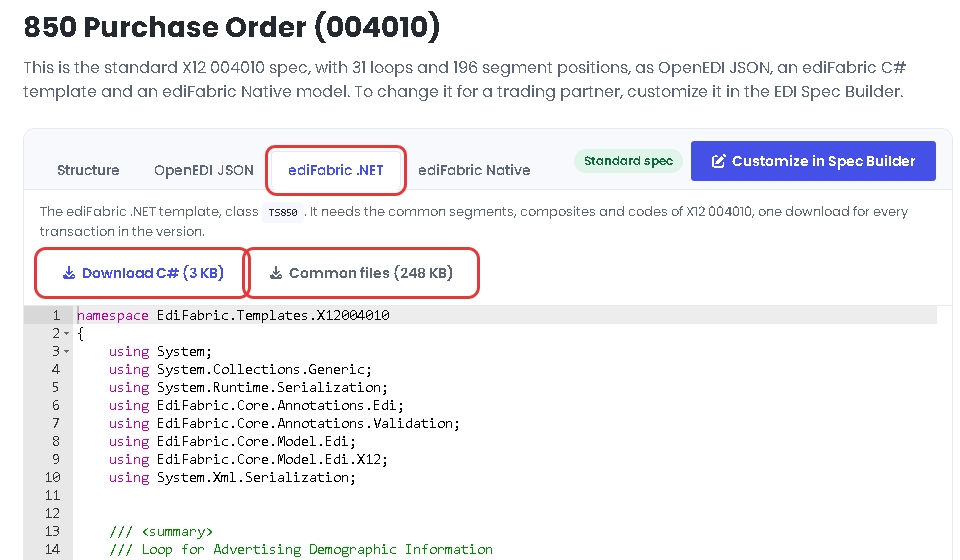
HIPAA transactions, such as 837P, download as one ZIP with the transaction and its Common folder, so there is no separate Common files button.
Class names are TS plus the transaction id, in a namespace for the standard and version. For example, 850 is EdiFabric.Templates.X12004010.TS850.
Add the templates to your solution
Put one version, or one trading partner, in one class library.
- Add a class library to the solution and install EdiFabric into it with
dotnet add package EdiFabric. - On .NET Framework only, reference
System.Runtime.SerializationandSystem.Xml.Serialization. - Unzip the downloads. Add the transaction file, for example
EF_X12_004010_850.cs, and every file in the Common folder of the version. - Reference the class library from your application, and pass its assembly name to the reader, as the examples do with
EdiFabric.Examples.X12.Templates. If the project isClassLibrary1:
using (var ediReader = new X12Reader(ediStream, "ClassLibrary1"))
It is the assembly name, not the namespace of TS850. The full steps are in EDI templates.
Customize a template for a trading partner
When a trading partner changes the standard, for example by making a segment mandatory, build the change in the EDI Spec Builder:
- Open the transaction in the EDI spec library and select Customize in Spec Builder. Name the copy, change it, and select Update.
- Select your spec in the EDI Spec Builder, open the ediFabric .NET tab, and select Download C#.
- Add the file to its own class library, as in Add the templates to your solution, and pass that library’s assembly name to the reader.
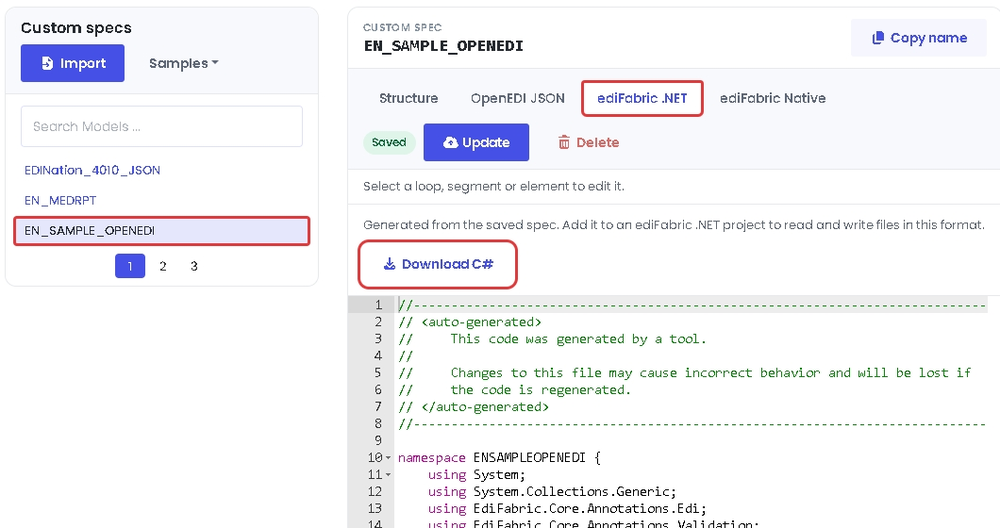
A custom template is one C# file, generated from the saved spec. It includes its own segments, composites and codes, so it doesn’t need the common files. You can also change the C# of any template directly, as EdiFabric.Examples.X12.ModifyTemplates shows. See How to modify EDI templates.
The same classes parse, generate and validate. EdiFabric supports the X12 and HIPAA versions. If a transaction is missing, ask for it.
- X12
- HIPAA
- EDI spec library (no registration)
- EDI Spec Builder
Warranty
The source code in these example projects is strictly for demonstrational purposes and is provided “AS IS” without warranty of any kind, whether expressed or implied, including but not limited to the implied warranties of merchantability and/or fitness for a particular purpose.
Links
- Install EdiFabric
- Tutorial
- EDI to database
- Knowledge base
- Community plan (free signup)
- Your Account
- Support
- Support: support@edifabric.com